


Preventing the 404
10 minute read
We recently shared a blog post about how to craft the perfect 404 page for your site. But, what’s even better than the best 404 page?
The user landing on the right page in the first place.
There are plenty of tools you can use to find and correct 404 errors so your site visitors can get where they want to go quickly and happily. And once that’s happening, you can convert those happy site visitors into leads and potential customers.
How to find your 404s
Leverage your content management system (CMS)
Many of the most popular content management systems (CMS) have tools for identifying 404 pages and redirecting as needed. This feature is often built into the CMS or is available as extensions or plugins. This tool does the work for you by identifying and redirecting broken and/or outdated URLs for pages that have moved or changed.
 Finding 404 errors doesn’t need to be hard!
Most Imarc clients use Craft CMS, which has a rich ecosystem of plugins, including plugins that can help with 404 errors, page redirects, and more. These can often be set up by your development team and then managed by site administrators on your internal team.
Use Google Search Console
Even if you do take advantage of the built-in functionality within your CMS, the Google Search Console is a great tool for site managers to have in their back pocket. It can help you understand how Google is crawling your site and indexing your site’s pages. It can also help to monitor, analyze, and improve your site’s standing within Google’s search results.
If you’re familiar with Google Analytics, it might be helpful to think of it this way:
Google Analytics deals with how visitors behave on your site.
Google Search Console deals with how search engines like Google behave on your site.
Finding the 404 Not Found errors that Google’s crawlers have come across is pretty straightforward:
Log into your Google Search Console account. If you don’t have one yet, create an account and add your domain.
Once you’re logged in, head to the left-hand navigation menu and find the Index section.
Click on Coverage, and you should see something similar to the below:
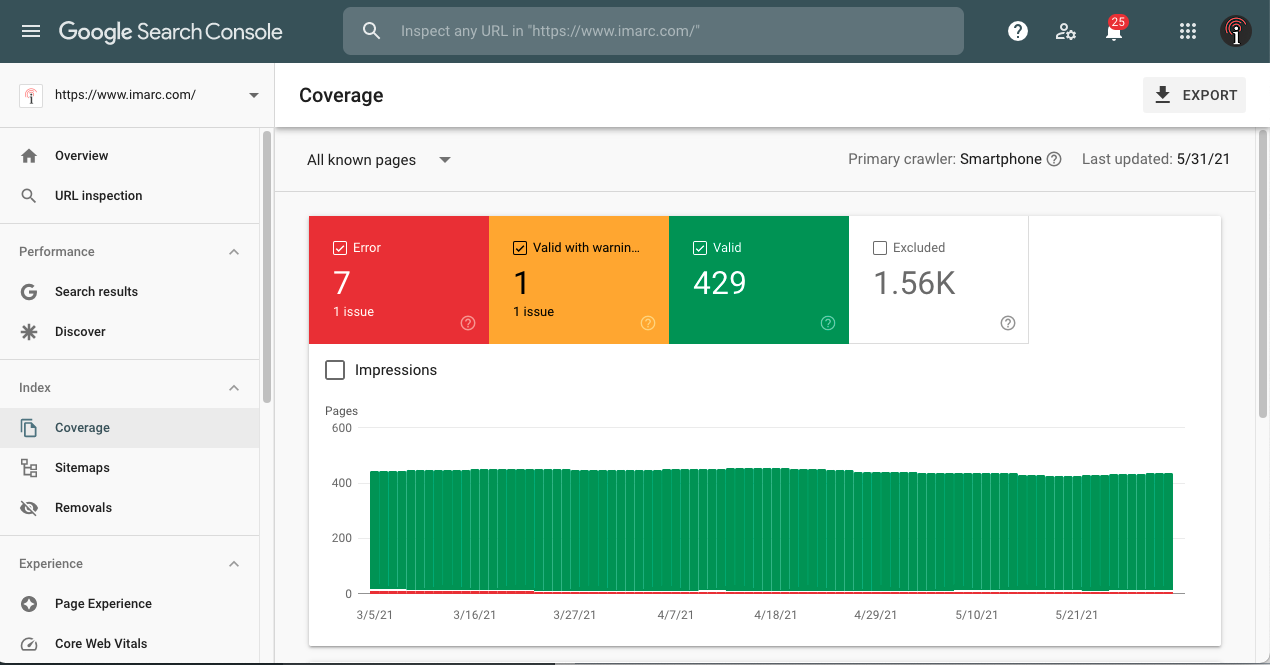 Google Search Console’s Coverage Report
Scrolling down through the Coverage Report will show you a list of URLs that resulted in a 404 Not Found error. Google Search Console, through its handy URL Inspection Tool, can even tell you about when it was crawled by Google and how it was found. It also gives you the option to re-crawl (“request indexing”) the page once you’ve fixed the issue.
Crowdsource it
For sites with reduced technical infrastructure, personnel, or budget – crowdsourcing can be the answer. Give site visitors a way to easily report 404 pages directly to your organization through a short online form placed on your site’s custom 404 page. Crowdsourcing via an online form can potentially allow small sites with very small teams to build a list of the most common 404 pages and correct those on an ad-hoc basis.
 Don’t worry! You have the tools to fix your 404 errors.
How to fix your 404s
By now, you probably have a list of a few 404 Not Found errors. Here are some common reasons for 404 Not Found errors and if the error is actually worth fixing (not all of them are):
Submitted URL. These are URLs that are meant to exist as a link on your site or your sitemap. Is it coming up as a 404? Yes, fix it. Then you can request a reindex once the URL is fixed.
Deleted page without a new equivalent. This is a deleted page that does not have a new home or equivalent page that a user should visit instead. No, don’t fix it. The 404 Not Found is exactly what is supposed to happen. The error should fall off your report in a month or so as long as you’ve removed any links to it from your site and sitemap.
A page that moved. Is it content that has moved and still exists but has a new URL (or a nearly equivalent page)? Yes, fix it. Specifically, you should fix it by adding in a 301 Moved Permanently redirect to the new page.
Bad URL. Is it a URL that you don’t recognize that has never existed on your site? Or maybe it’s a mistyped version of a real URL? Fix it if it makes sense to do so. Most of these bad URLs are user errors that are outside of your control as the site administrator. But, if you start noticing a pattern of a handful of frequently occurring 404 Not Found errors (people keep going to [your-site]/product-short-name instead of [your-site]/product-much-longer-name), you may want to add a redirect to give them a helpful nudge in the right direction.
After fixing what you need to fix, you may want to request a reindex of a page so that your corrections start making their way to Google’s search results as soon as possible.
Wrapping Up
404 Not Found errors are a fact of life. We get it – it can feel frustrating or intimidating to see all those errors show up on reports from your CMS, Google Search Console, or any other tool you might use. But using the strategies we’ve talked about here helps both search engines and site visitors get to those lead-generating pages quickly and happily.
And don’t forget: Imarc is here and ready to help with all of this and more. Let's talk!
We stay on top of the latest trends so you don’t have to. Subscribe for a quarterly dose of marketing tips, web design techniques, creative trends, and a whole lot more, plus a look at our featured client work.